Latest Post

VLC Media Player is the most popular and robust multi format, free media player available. The open source media player was publically released in 2001 by non-profit organization VideoLAN Project. VLC Media Player quickly became very popular thanks to its versatile multi-format playback capabilities. It was aided by compatibility and codec issues which rendered competitor media players like QuickTime, Windows and Real Media Player useless to many popular video and music file formats. The easy, basic UI and huge array of customization options have enforced VLC Media Player’s position at the top of the free media players.

Flexibility
VLC plays almost any video or music file format you can find. At its launch this was a revolution compared to the default media players most people were using that often crashed or displayed “codecs missing” error messages when trying to play media files. VLC can play MPEG, AVI, RMBV, FLV, QuickTime, WMV, MP4 and a shed load of other media file formats. For a full list of compatible file formats please click here. Not only can VLC Media Player handle loads of different formats, VLC can also playback partial or incomplete media files so you can preview downloads before they finish.
Easy to Use
VLC’s UI is definitely a case of function over beauty. The basic look does however make the player extremely easy to use. Simply drag and drop files to play or open them using files and folders then use the classic media navigation buttons to play, pause, stop, skip, edit playback speed, change the volume, brightness, etc. A huge variety of skins and customization options mean the standard appearance shouldn’t be enough to prevent you choosing VLC as your default media player.
Advanced Options
Don’t let VLC Media Player’s simple interface fool you, within the playback, audio, video, tools and view tabs are a huge variety of player options. You can play with synchronization settings including a graphic equalizer with multiple pre-sets, overlays, special effects, AtmoLight video effects, audio spatializer and customizable range compression settings. You can even add subtitles to videos by adding the SRT file to the video’s folder.
Summary
VLC Media Player is quite simply the most versatile, stable and high quality free media player available. It has rightly dominated the free media player market for over 10 years now and looks like it may for another 10 years thanks to the constant development and improvement by VideoLAN Org.
Screenshot 1Screenshot 2

Watch Improving PC Boot Time Using CCleaner

Improving PC Boot Time Using CCleaner

Probably the most popular freeware cleaner globally with over 2 billion downloads since its launch in 2003. Piriform’s CCleaner is a quick and easy to use program which makes your computer faster, more secure and more reliable. CCleaner removes cookies, temporary files and various other unused data that clogs up your operating system. This frees up valuable hard disk space allowing your system to run faster. Removing this data also protects your anonymity meaning you can browse online more securely. The built in Registry Cleaner fixes errors and broken settings to make your computer more stable. The simple, intuitive UI and rapid but powerful cleaning make CCleaner a favourite among novices and techies alike. Professional, Network, Business and Technician Editions of CCleaner are also available for serious users.
A Faster Computer
Browsing the internet your computer picks up a whole host of unnecessary files, cookies and history. The same thing happens when you run most programs on your computer – lots of temporary files and settings are saved. CCleaner removes these unused files and settings to free up valuable hard drive space, enabling your system to run faster. The default settings only focus on typical junk files and locations so you’re unlikely to lose important information unless you alter these. A Startup Cleaner also helps you to identify and remove unused programs running in the background when you start your computer. This makes the startup time shorter and puts less strain on your hard drive throughout use. 
Less Crashes & System Errors
If you notice lots of system freezes, error messages and often experience crashes, the chances are your registry become cluttered with unused files and broken settings. CCleaner’s fully featured Registry Cleaner identifies these issues and fixes them. The registry analysis takes seconds and cleaning just a little bit longer. Prompts advise you when to save backups to avoid losing important data.
More Secure Browsing
Advertisers and websites track your behaviour online with cookies. Saved passwords, cached data and internet histories make your identity less secure. CCleaner removes these files to make your browsing experience confidential, meaning you are less likely to suffer from identity theft and/or online fraud. The military grade Drive Wiper ensures any data you want to be permanently deleted, stays deleted.
Customisable Cleaning
CCleaner Tools and Options tabs allow you to customise cleaning options to fit your needs. If you are not a savvy user, you might want to stick with the safe default settings. Advanced users can uninstall unwanted programs, select which cookies to save, customise cleaning settings and setup system monitoring.
Summary
CCleaner has earned its position at the top of the freeware cleaners offering the sort of features premium programs struggle to compete with. The clean, intuitive UI makes it one of the easiest programs to use, but don’t let its size and simplicity fool you. This is a powerful utility for improving your computers performance. Piriform’s regular update process means CCleaner is constantly improving and its popularity will continue to grow.

The features which are present in other BitTorrent clients are here in µTorrent, including scheduling, bandwidth prioritization, RSS auto-downloading and compatibility with BitComet-Mainline DHT. µTorrent also supports peer exchange and the Protocol Encryption joint specification (compatible with Vuze / Azureus 2.4.0.0 and above and BitComet 0.63 and above).
Unlike many other torrent clients available, µTorrent does not eat away at valuable system resources; in fact, the program typically runs on approx. 6MB of memory. µTorrent is contained within a single executable file, smaller than 1 MB.

Features include:
  • BitTorrent Labs icon to the status bar
  • Help menu items for bundle and BitTorrent Labs
  • Change logging in settings to remove OpenX
  • Keyboard shortcut to refresh ads now
  • Overlay image when "i" is hovered over
  • Custom PDD
  • Teredo Tunneling / IPv6 support
  • UPnP support for all versions of Windows
  • Peer exchange
  • Protocol Encryption
The customization options for icons, toolbar graphics and status icon replacements are vast, you can even create your own. µTorrent incorporates localization support and has language support; therefore it will automatically change to your system language.
The µTorrent software was designed to use only minimal resources, yet still offering the functionality comparable to larger BitTorrent clients. µTorrent is very user-friendly; the program updates are not scheduled and are only released when thoroughly tested. This product is available for all major releases of Windows.
µTorrent provides high quality service in a tiny package.


Running A Rapid Scan On Your Hard Drive With Avast! Free


Simple, improved UI
The latest version includes a much simpler and quicker to use UI than previous versions. Key features can be easily reached in the sidebar and the homepage is now customizable so you can access the tools you use most often directly. The overall appearance is clean and uncluttered, with buttons intuitively labelled and positioned.
Comprehensive Protection
Avast are constantly updating their database of virus definitions, meaning your computer will be protected against the latest spyware, viruses and potentially hazardous websites. Avast’s large and active community quickly alerts the development team of new security threats which are swiftly countered and added to Avast’s significant database. The browser add-on further improves computer security with features like cookie and social tracking blocking.
Speed
Avast Free Antivirus comes with a range of standard scanning options, based on depth and speed. Rapid scan will suffice in most cases - targeting removable media and the files you select, identifying security threats in usually less than a minute. A startup scan will launch automatically on boot up and is a useful, regular security check. The optimized scan engine in the latest version means scanning of text content is significantly faster than previous versions. Scanning of EXE files is around also faster. Improved memory usage means Avast Free Antivirus should cause less strain on your system so you can continue with other tasks faster.
Summary
Avast Free Antivirus is definitely one of the best free total security managers available. It is relatively lightweight and efficient, while still providing comprehensive security protection. The browser add on can slow browsing speed and the scanning might not be as detailed as some premium antivirus options. But the simple, effective UI and strong security capabilities make Avast Free Antivirus a very good choice for those looking for free computer security.

Perhaps the better question is: Is it time to switch back to Firefox?

One of our staff members takes the plunge and uses Firefox Quantum for a month to see what all the fuss is about.
If you’ve never used Firefox before, or you jumped ship to another browser in the last few years, then Firefox Quantum is well worth downloading and installing. It’s fast, privacy oriented, endlessly customisable, easy to use, easy on the battery, and in many respects is better than its main competitor, Chrome.  It’s also packed with well thought out and helpful features.


Firefox Quantum: Better than Chome? We think so


Chrome may have just lost its sparkle

Google’s Chrome may be the world’s most popular web browser, but it might be time to admit that just because Chrome is the biggest browser out there, doesn’t mean it’s the best, anymore.
It may be hard to believe now, but anyone who can remember the web back in 2010 will remember that Mozilla’s Firefox was a pretty big player. Back then, it alone held sway over a third of the market, which considering the giants it was competing against, such as Microsoft, Yahoo, and of course Google, wasn’t bad going.

Chrome is not the only option out there, google it and see!


These days, Chrome can seem almost unavoidable, especially if you use an Android device. But that doesn’t mean you have to use it. There are a host of alternative browsers from Opera, Safari, Maxthon, and of course Mozilla’s Firefox.
There are many reasons why you should consider making the switch to Firefox.
For a start the Mozilla Foundation, the company behind the browser is, in their own words, “a non-profit organization that promotes openness, innovation and participation on the Internet.” That statement, if nothing else, should make anyone who uses Firefox feel better about themselves.
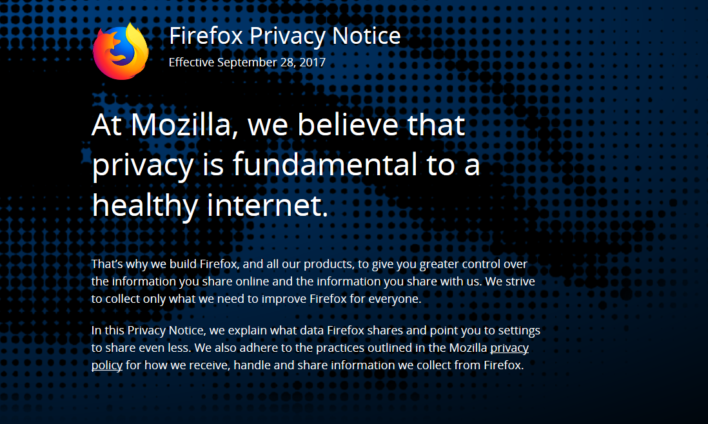
It’s also worth pointing out that considering the recent scandals and increasing awareness around the use of people’s data and privacy, such as the Facebook and Cambridge Analytica debacle of earlier this year, that Mozilla have been shouting about user control of their data since back in 2014.

Privacy? Mozilla have been having that conversation for years before it hit the headlines


Privacy built in


In 2014, Mozilla announced that it was majorly concerned about the way people were so easily giving up personal data to the ‘Web’ announcing that “fighting for data privacy — making sure people know who has access to their data, where it goes or could go, and that they have a choice in all of it — is part of Mozilla’s DNA.”
Practically four years later in 2018, Mozilla’s warnings of yesteryear are perhaps more prescient than ever before. Firefox has had a whole load of rules and limits in place for a long time, restricting what itself and others can infer from user data, and they take great pains to balance privacy against commercial interest. Plus they are not the personal data gathering monopolistic entity that is Google.

Don’t be evil?

You may know that one of Google’s big mantras used to be ‘Don’t be evil,’ but as we reported last month, that little line has recently quietly disappeared from their Code of Conduct. I’m just saying.
All that’s great, but I thought this article was all about why I should be thinking about switching to Firefox? It is. I’ve just taken my time getting there, but thanks for reading this far all the same. We appreciate it. So, why Firefox?

Speed. Firefox is fast and easy on the battery

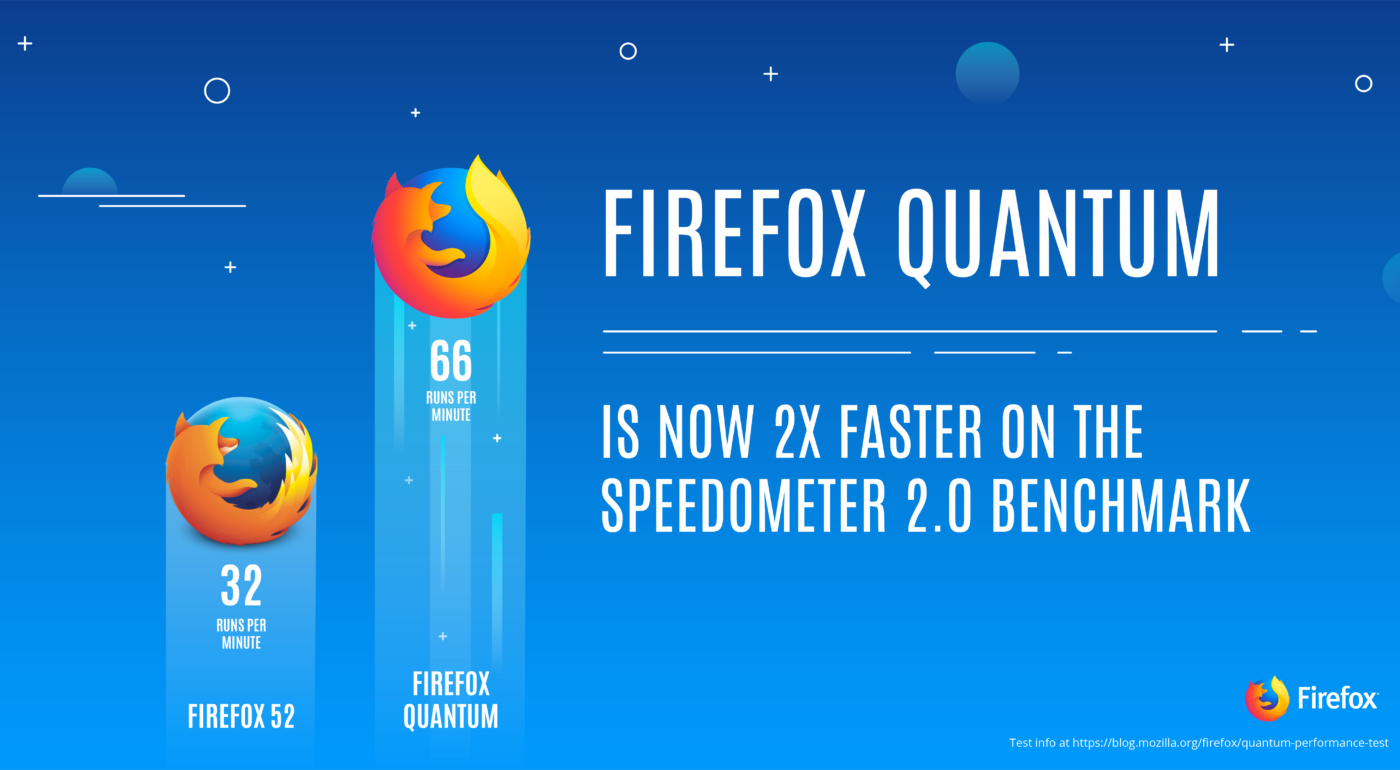
Firstly, Firefox, or Firefox Quantum as the new version first released back in November, 2017, is known, is fast, faster in fact than any other browser currently available. For laptop users it’s also important to note that it doesn’t permanently damage your battery every time you use it. In fact, one of the shining lights of Firefox Quantum is that it really looks after your battery life, especially in real life conditions. Now, OK, Microsoft’s Edge has the best battery performance of all the browsers, but that’s Edge, and it’s not very good, despite what Microsoft insist on telling us.
As a browser, Firefox has taken some really good moves in the last year or so. The latest edition has finally made good on a whole lot of potential Mozilla have been striving for in the last year or so. Firefox is now a cutting edge way to surf the web.

Chrome and Firefox come from the same stable

Not many people know that both Chrome and Firefox are built using the same source code as each other, known as Chromium. But Mozilla have essentially re-built their browser from the ground up.
Firefox now has one of the cleanest and up-to-date takes on what a web-browser should be. It’s also a ridiculously easy browser to download and install.
Firefox’s recent changes aren’t just skin deep either. There’s an awful lot of impressive work that’s gone on behind the scenes and beneath the skin. For a start, Firefox has been built to take full advantage of today’s multi-core processors in a way that none of the other browsers out there, Chrome included. This means that Firefox is faster when working with multiple open tabs, and it’s surprising just how much crisper, cleaner and faster Firefox is than other browsers.

Firefox may just be another web browser, but it could also be the best


Image result for firefox


Crucially for most users, none of the complex working going on beneath the surface are all that important. Firefox is the same multifaceted and ever capable browser it always has been, just refreshingly better.
Perhaps the standout feature of the new Firefox is the screenshot tool (right-click in the context menu), which can capture an entire web page without the need to scroll up and down. It can also just capture a section if you’d rather. The screenshot is then uploaded to Mozilla’s servers and is stored there for 14 days for you to share or download.

But what about all my Chrome extensions and add-ons?

Don’t worry, you can keep them. Don’t forget, Chrome and Firefox are built on the same engine, which means that virtually all the Chrome extensions work just as well on Firefox. The same also goes for anyone using Opera extensions. Hurrah!
There are a host of extensions and the ability to customise user extensions is impressive to say the least. The changes aren’t just limited to the desktop PC version either. The updated Firefox Mobile app is also just as fast and lets you move effortlessly between devices.
In fact, after having used Firefox almost exclusively for the last month or so, I’m seriously considering moving away from even my own current favoured and excellent browser, Opera, permanently.
Firefox’s ability to integrate with mobile, is one of the most seamless and best efforts from any browser available. There’s a mobile version for every major platform so keeping everything in sync is easy.   

Firefox is not the Mig-31

Clint Eastwood has nothing to do Mozilla, as far as we know…


As an aside, there is no relation between the Firefox browser and Clint Eastwood movie of the same name from 1982. The movie was one of those eighties movies about US-Soviet tensions, and the theft of a prototype Russian stealth plane. It’s a tense and often moving movie set at the height of the Cold War. The last 20 minutes are somewhat silly, but still a good watch.

So what do we think of Firefox?

Firefox is a really good browser that looks good, is easy to use, and a definite and worthy contender to Chrome, and one that is making waves in 2018. It’s Hipster in a way that was cool before Hipster wasn’t cool.


Facebook has announced the end of plans to build drones that could give sustained and stable internet access to the developing world.

The ‘Aquila’ Internet Drone Project has been grounded, ending Facebook’s plans to build a network of high-altitude solar-powered drones in the skies that could have given sustained and stable internet access to the developing world. 

Facebook broke the news in a blog post earlier this week, saying that while the company was still committed to the original goal of bringing more people online, it would instead rely on other companies to build aircraft, and stop building its own from the projects base in the United Kingdom.

The now grounded Aquila drone in flight: The wingspan exceeds that of a Boeing 737…


Lofty Goals

Facebook had originally intended to construct an entire fleet of Aquila drones, and provide Internet access to some four billion people around the world who currently have no internet access, or limited connectivity. “No one has ever built an unmanned aeroplane that will fly for months at a time, so we need to tune every detail to get this right,” Zuckerberg said some years ago.  
The prototype Aquila drones that were built weighed around 1,000 pounds (450 kilograms) and had a longer wingspan than a Boeing 737. It’s estimated top speed at altitude was expected to be around 80 miles per hour. The Aquila drones would also have run on autopilot with manned ground crews to manage certain manoeuvres.

Fallen to Earth with a bump

However, technological difficulties, and mechanical issues had delayed and set the project back. Those, coupled with rising competition from the aerospace industry finally ended Facebook’s dream of connecting people on a global level. “When we started the Aquila program back in 2014,” the Facebook blog reads, “very few companies were involved in this area…it’s been exciting to see leading companies in the aerospace industry start investing in this technology too — including the design and construction of new high-altitude aircraft…Given these developments, we’ve decided not to design or build our own aircraft any longer.”
Google, or rather Google’s parent company, Alphabet, quietly confirmed that it had closed its own internet drone project, ‘Titan’, in early 2016 – a mere two years after it competed fiercely with and outbid Facebook to buy the business.

A new warning has been issued for hotel guests using public Wi-Fi connections.

Most people tend to the think of cyberattacks, data breaches, and hacking as the work of highly-skilled, dark web-style operatives. The reality, though, is not quite so skilled. Not only are sophisticated tools available for sale to low-level cybercriminals, but social engineering plays a large part in victimizing consumers. Tricking someone into thinking their network is locked up or handing over their personal identifiable information is a lot easier than actually stealing it yourself.


A new warning has been issued to summer holiday travelers, one that builds on a known threat. For years, consumers have been warned about the dangers of connecting over public wifi, as they cannot know who else is on the connection and can see what they’re up to. Now, wifi “masking” of known, trusted networks allows even the least skilled would-be hacker to steal information.


So what does this mean for hotel guests?

Consider the example of traveling to Hawaii. You book reservations at a four-star resort, “Kona Key,” for example. The Kona Key wifi connection appears in your device’s list when you reach the property. During your stay, you find other available connections, some of them stronger. Kona Key Poolside, or Kona Key Bar and Grill. Perhaps there’s a Koana Key connection, too. Those are the spoofed connections. By setting up wifi connections that are not associated with the property, scammers trick guests into connecting over the wrong wifi. This unsecured connection allows the scammer to see everything the guest is doing, including entering usernames and passwords, credit card information, and more.

Unfortunately, it happens far too often 

According to the Identity Theft Resource Center, there are 50 new cases of identity theft every minute, utilizing tactics like hacking, data breaches, POS skimming, and more. Year-over-year record-setting numbers of data breaches continue to reach epidemic proportions; in 2017, over 1,500 separate data breaches resulted in the compromise of more than 179,000,000 consumer records. There is no indication that these numbers will decrease in the near future, and if anything, new technology and new tactics such as this one may lead to even higher numbers than before.

Author Name

Biểu mẫu liên hệ

Tên

Email *

Thông báo *

Được tạo bởi Blogger.