Articles by "REVIEWS"

Hiển thị các bài đăng có nhãn REVIEWS. Hiển thị tất cả bài đăng

  Aside from a looming 'Ultra' tier that could raise prices while restricting features like 4K, HDR or simultaneous streams, Netflix has recently notified users of one feature that's definitely going away: written user reviews. While Netflix dropped the five-star rating system from its apps early last year, on the website users can still write down and share their thoughts.

     In an email notifying users who had recently left a review, Netflix blamed the change on declining usage, which at least one user turned that back around on the company for removing bylines and star ratings. Despite their limited appearance on the service, even recently-debuted shows feature hundreds of comment entries. According to CNET, while Netflix plans to stop accepting reviews as of July 30th, they will be readable until mid-August.
  If you're wondering why Netflix might make the change, a quick perusal of the reviews suggests some possible answers. As it spends billions of dollars on original content, the company may not want to enable a public forum for it to be disparaged, or give space for people to comment on third-party content that has been removed. Also, for a company that famously does not provide numbers regarding the popularity of content or participate in tracking by outsiders, the feature stood out curiously as a public representation of subscriber's responses.
Netflix 'The Last Jedi' reviews
Netflix user reviews for 'The Last Jedi'  The use of "review bombing" by trolls in search of new battlefields for their cultural warfare is also a problem That's what happened to comedian Amy Schumer's Netflix special last year -- just before the company switched from stars to a simpler thumb up/down system -- while recent releases like The Last Jedi show similarly suspicious trends. For a feature that doesn't play into its continually evolving recommendations and automatically sorted categories, investing in the kind of community management or moderation required to deal with internet trolls might not make sense.
 None of the tools we've recommended for augmenting your Netflix use include spaces for written reviews, although a site like InstantWatcher will include any awards a piece of content has received and put IMDB one click away. If you'd like to see your own reviews before they go away for good, then click right here, it's just as simple as pulling up your viewing history.

Bluntly, I’m a big fan of the Beoplay H4's look, as it combines simplicity with a metallic design. Beoplay offers the headphones in a range of colors including Steel Blue, Black, Tangerine, Vapour, and Charcoal Grey. I've been testing out the Black models, which blend well with pretty much anything. I have to admire the boldness of anyone who would go with Tangerine.

An area of disappointment is the partially plastic build. Both the left and right ear cups are plastic with a shiny metal circle on the outside. The circles glimmer in direct light, which looks cool. You also have the small B&O logo on either cup, which is nice and subtle.
Connecting the ear cups to the top band are pieces of metal, with a brushed finish. It gives the H4’s some structure, but they can still flex to fit on any size head comfortably. Along with these metal pieces, there's an exposed braided cable that goes from the bands to each ear cup. That, of course, provides connectivity and gives you an idea of how far you can extend the ear cups down. 
The padding on each cup and the top of the band is lambskin leather, affirming the high-end design. The cups themselves are comfortable and have ample padding. They're circular, unlike the oval design that manufacturers like Bose opt for. Each ear cup swivels flat (though not fully 360-degree) so you can more comfortably wear them around your neck.
Controls, a jack for an audio cable (if you're not a fan of wireless), and the micro-USB port are all found on the right ear cup. The included audio cable doesn’t have any in-line controls, but of course it's entirely optional as the headphones are wireless first. You also get some reading material and a micro-USB cable in the box. Surprisingly, there is no carrying case or even cloth bag included, and at a $299 price point, I was at least expecting something to carry them in.

A customizable sound experience


Bang & Olufsen has been doing audio for a long time, and the sound quality of the H4 is great. You get a well-balanced experience that keeps high and low tones at a similar level with a slight emphasis on deeper bass tones.
The Beoplay app for Android and iOS is where you can customize the listening experience. Through the ToneTouch section, you can manually control the sound profile by tapping anywhere on an array that's divided into four quadrants: Warm, Excited, Relaxed, and Bright. The spot you prefer will vary depending on your taste as well as the material, and you can save your selection as a preset.


Can't choose? Bang & Olufsen has also created four presets for you: Commute, Clear, Workout, and Podcast. Each preset puts a dot in a specific place on the Warm/Relaxed/Excited/Bright array. Depending on where the dot is, the high tones, low tones, and bass will change.
If you’re the type of listener who likes an earth-shaking bass experience, choosing Excited will lower all tones, but Warm and Bright will do the opposite. For balanced sound, I’d suggest setting the dot to right between Excited and Bright. I found myself navigating to Warm for most music, with pleasing sound for many genres, including pop and rock 'n' roll.
The core everyday use that disappoints is taking phone calls through the headphones. Bang & Olufsen put the microphones on the ear cups, as there is no inline control on the audio cable (a traditional location for this). This leads to varying results, since, if you don’t speak loud enough, it may be hard to hear you on the other end, depending on the ambient noise. 

Using them in real life


IMAGE: DIAMOND NAGA SIU/MASHABLE

My primary concern with over-the-ear headphones is that they always have the potential to cause discomfort after extended use, especially since I wear glasses. However, I can confidently say the B&O H4's didn’t feel uncomfortable to wear, even with a full day of use, with a wide variety of activities, from taking a train to walking a dog. The ample padding underneath the leather made them quite comfortable.
Bang & Olufsen promises up to 19 hours of battery life over Bluetooth; I found that it came pretty close. It got through a full day of listening at various volumes and frequent changing of sound profiles. I found that using the included microUSB cable with a regular power outlet, I could get a full charge in just under 3 hours. Unfortunately, fast charging with the H4s isn't possible.
I was impressed with the sound quality, especially with using them in public places or while commuting. The H4’s don't have active noise cancelation, but they are isolating: With the volume at about 35% I found that I couldn’t hear everyday noises and even people having a conversation quite close to me.
The headphones can also play plenty loud, with very little distortion even at maximum volume.

Final thoughts


uld expect a high-quality experience from your headphones. Given the price point, I still think B&O should include some kind of case, but in "real life" I found myself not really missing it. Instead of packing them away, I'd usually just wear them around my neck when not listening to music, and thanks to the swivel ear cups that was a non-issue.

The design screams simplicity, and they look fantastic. The padding in the ear cups and top band leads to a comfortable experience on long days. Most importantly, they sound outstanding. In the end, the Beoplay H4 headphones live up to their eyebrow-raising price tag

Browse the internet securely and anonymously, wherever you are.

There are a lot of great reasons to use a VPN, or . When traveling abroad, it can help you connect to content you subscribe to regardless of local licensing agreements. When traveling within your country, it can still add a layer of security to public hotspot of hotel WiFi connections. Some users deploy VPNs to protect their privacy from social media platforms and advertising trackers, while a smaller number of people do use them for more “sensitive” personal reasons.
While there’s little doubt that a VPN can help everyone from the most casual user to internet pros, there are some questions when it comes to which one to choose. Ideally, users can find ones that meet their data-versus-cost needs, and ones that will afford them a freemium model before committing to set amount of purchased data per year.
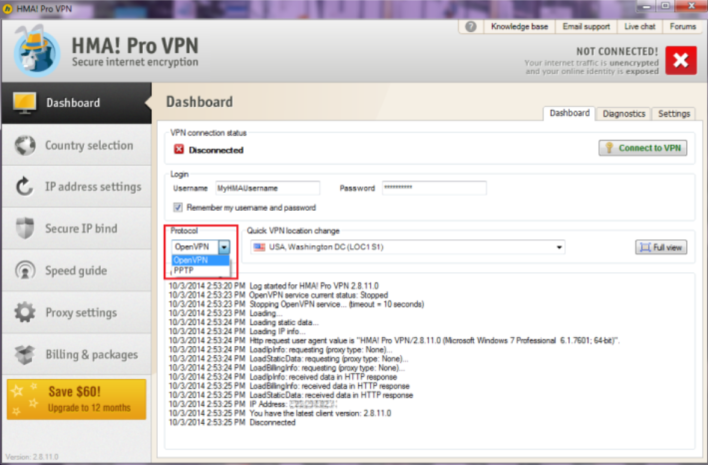
HMA! Pro VPN
HMA! Pro VPN – Browse the internet securely and anonymously, wherever you are.

More for your money

HMA! Pro VPN (which yes, stands for “hide my a$$” in true VPN nature), part of the Avast security company, offers incredible protection at highly competitive prices. Even better, there are multiple payment plans to choose from, so you’re not locked into service you don’t want or need. Students can take advantage of special in-school pricing, while businesses can choose from three different pricing structures to protect their entire network of computers. Corporate users can even request custom pricing tailored to their specific network needs.
But what do you get for these price? A standard license installs on up to five devices across Windows, Mac, iOS, Android, and Linux, letting you wrap yourself in your own private tunnel to the internet with one click. Once installed, there are no data limits, which means you can upload, download, and stream content without worrying about running over your limit. In order to ensure that your VPN use is seamless, HMA! maintains more than 700 servers in over 190 countries, connecting you no matter where you travel.

Stand-out security 

All of that may sound great–and fairly standard for the better end of the VPN market – but the security is what sets it apart. HMA! does not monitor or log any user activity. The only thing they can access is the legally-required IP address they assign you, and even then, that’s only for three months. Some other encryption apps have unfortunately forgotten to be as forthcoming with the legal requirements in the past, and others like the early days of Snapchat have neglected to factor in the monitoring or storage from the cellular providers who are supporting the mobile device. HMA! can’t maintain a log of your use because they never gathered it in the first place.
HMA! VPN Support
Get superb support with HMA! Pro VPN

Superb support

HMA! Pro VPN customers can choose a combination of desktop and mobile protection with their accounts, which can be done navigating to the company’s site or downloading the app from the corresponding app store for your device. Currently, the tool supports twelve languages from major markets, and offers a thirty-day free trial of its software with no upfront charge. If you’re not satisfied with the product after purchase, the developer also offers a 30-day money back guarantee along with seven day a week customer support.

Any Software, Uninstalled Completely, In Seconds.

What’s not to like?

The standard Add/Remove uninstaller that comes with Windows is a decent enough little tool from Microsoft, that for the most part does it’s job, but let’s face it, it’s not great. More often than not it leaves trace elements of the program you’ve asked it to uninstall, and over time this can lead to an accumulation of junk data you a) didn’t ask for, and b) clogs up your system.
It’s better than the one that comes with Windows…..
. For a start, it looks good, and the interface is intuitive and easy to use.
IObit also gives you a categorized overview of all the software (wanted/needed/or-not) on your machine, and features an Advanced Uninstall Mode for advanced users.
Perhaps however the most outstanding feature (for us anyway) is the ability to uninstall several different programs at once. This is especially handy if you’re looking to do a spring clean of your computer or free up some space in a hurry.
Another key point worth making is that as well as completely removing programs from you machine when you choose to uninstall them, it removes all the junk clutter and left over components that the Windows uninstaller tends to leave behind. Why Windows in 2018 still does this sort of thing, is anyone’s guess.
The cleanup utility is another winner of a feature, designed purely to find and eliminate invalid and non functioning shortcuts, useless and incomplete downloads, and also a cache cleaner which works exceedingly well.
IObit also comes fully loaded with autostart utilities and task manager options with easy to see running processes and programs that you can end or modify at will, and again, quicker and easier than using Windows own Task Manager.
Conclusions:
IObit uninstaller is good, really good. IObit is easy to use, effective, and much, much better than the one that comes with Windows. It’s also easy on system resources, and isn’t annoying.


Your Mac. As good as new.

Macs are glorious machines with a fiercely loyal fan base. Super-fast and with a killer OS, it’s no wonder people fall in love with them. However, in time even the newest and fastest of Macs will begin to slow down, as it gradually gets clogged up with unnecessary files and content.
But worry not – help is at hand! With the all-new you can quickly and easily clean, optimize, and maintain your Mac. CleanMyMac 3 scans every inch of your system, removes gigabytes of junk in just two clicks, and monitors the health of your computer.
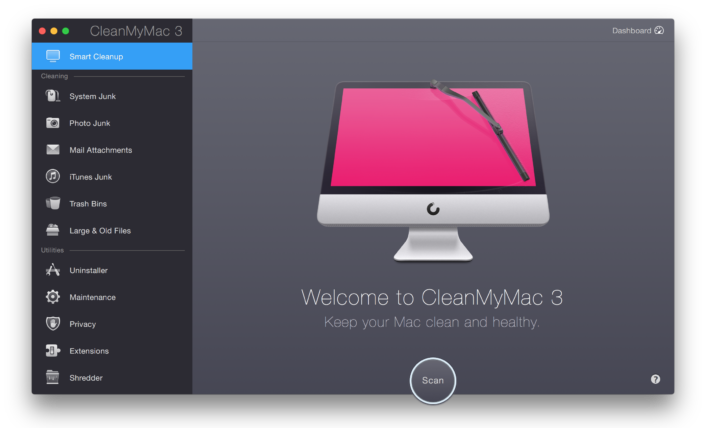
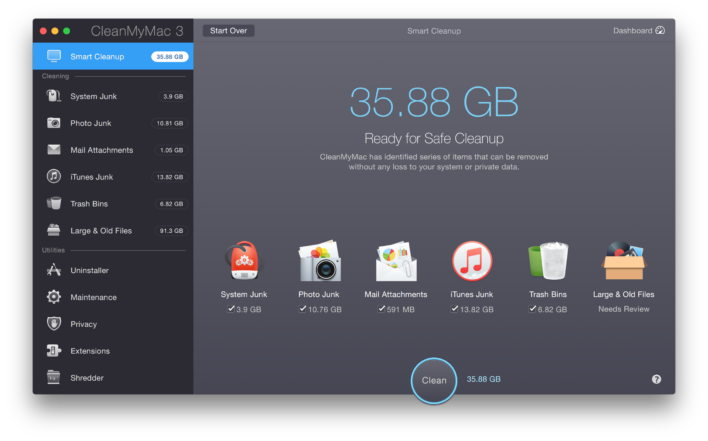
Smart Cleanup Welcome Screen
CleanMyMac 3 – Powerful, intuitive, simple.
Clean, optimize, and maintain your Mac with the all-new CleanMyMac 3. It scans every inch of your system, removes gigabytes of junk in just two clicks, and monitors the health of your Mac.
And we’re talking major deep-clean here. CleanMyMac 3 scans your whole system and removes all the clutter from the hard drive, including system junk, caches, large and old files, mail attachments, and much more. During a full scan with CleanMyMac, the average user finds about 74 GB of junk to clear out.
That’s because it scans everything on your Mac, including your Mac’s system, iTunes, Mail, Photos, Trash bins, and even those pesky old folders that have been secretly avoiding you!

One-button cleaning

Macs are easy to use. And MacPaw believes Mac cleaners should be too. That’s why CleanMyMac 3’s Smart Cleanup relies on just one button to scan every inch of your Mac and then remove the junk it finds. And, it only selects files that are 100% safe-to-delete, so you never have to worry about removing the wrong ones. It’s not just an automatic cleaning utility — it’s incredibly smart.
With Smart Cleanup, all you need to do is click “Scan” and then “Clean” — that’s it. It knows what can be cleaned up for extra space on your Mac, making it incredibly safe to use.

How does CleanMyMac 3 know what to clean up?

The thing about Smart Cleanup that makes it stand out against other  is its Safety Database.
The Safety Database is a list of items, rules, and exceptions that CleanMyMac refers to in order to correctly select and clean out the junk on your Mac. It’s been updated and expanded over the past seven years — that’s seven years of working with developers to help improve CleanMyMac’s cleaning algorithm.
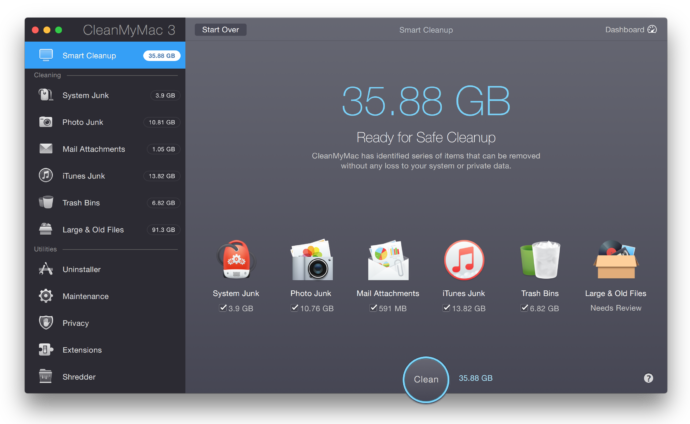
Smart Cleanup Scan Results
Smart Cleanup in just two clicks

Smart cleaners are safe cleaners

The clever types at MacPaw tell us: “Our number one priority is keeping your Mac safe. We’ve been building our safe cleanup algorithm for many years now. It’s called the Safety Database and is a list of rules, items, and exceptions that CleanMyMac 3 refers to every time it scans your Mac. With CleanMyMac 3, you can be absolutely sure that you’re only cleaning up the right files.”

Photos

Trim gigabytes off your photo library — without losing a single picture.
Did you know? It’s not your photos that are wasting space, it’s the hidden cache in your Photos library. You see, anytime you view photos stored in iCloud or use Faces, cache files pile up on your Mac. In time, these files can add up to gigabytes of data, especially if you have a large library. The good news is CleanMyMac 3 cleans out all of them, without harming any of your precious photos.
As the name implies, the Photo Junk module cleans up all the useless files left over by Photos. It’s 100% safe to use because it doesn’t remove any actual photos. The module scans your Photos library, locates useless cache files and heavy RAWs that take up space, and then deals with them seamlessly, to free up much-needed space.

RAW files = GB of space

When you import RAW files into Photos, the app creates JPEG copies of them. These JPEGs are what you see in Photos — and heavy RAWs just sit on your Mac, forgotten. If you no longer need the RAW originals, CleanMyMac will remove them* to save you gigabytes of space. But don’t worry: it will always ask you first.
*Please note, this feature is not yet available on macOS High Sierra.

What if I’m still using iPhoto?

Just like the Photos app, iPhoto has tons of junk hidden in its library. It’s a whole different kind of junk, and CleanMyMac cleans that up, too. Clever, right? Photo Junk searches your iPhoto library to locate useless and hidden copies of your pics, kept by iPhoto after you rotate, or crop, for example.
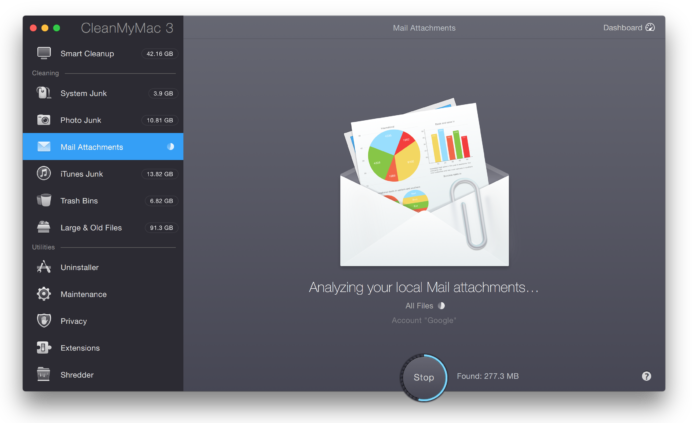
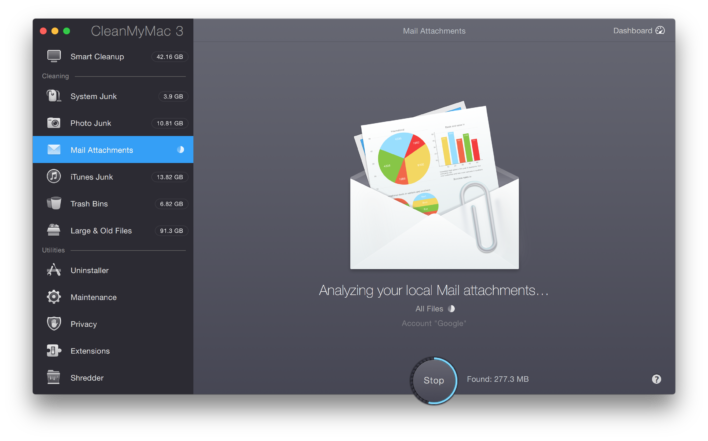
Mail Attachments Scanning
Clean up your mail effortlessly.

Mail

Mail is a lot heavier than it looks! Each and every attachment you receive in Mail, from PDFs to signatures, get saved to your Mac. Know what that adds up to? A lot! Plus, if you want to manually clean out those gigabytes of attachments, you’d have to crawl through your entire mailbox searching for every single paper clip. Save yourself the trouble — CleanMyMac 3 is happy to take care of it for you.

iTunes

There’s more than just tunes in your iTunes… iTunes stores gigabytes of files other than your music, including outdated device backups, old software updates, broken downloads, and more. But it’s easy to clean up with CleanMyMac 3. Just do a quick a scan of iTunes and you’ll have more space for your tunes in no time. Simple.

Find those hidden files

Use CleanMyMac 3 to discover all the old files you’ve forgotten about on your hard drive. It scans folders and disk drives to show you the files that haven’t been opened in a long time. Why hang onto stuff you never use? Let CleanMyMac 3 gather it all together, and then you decide what’s worth keeping.
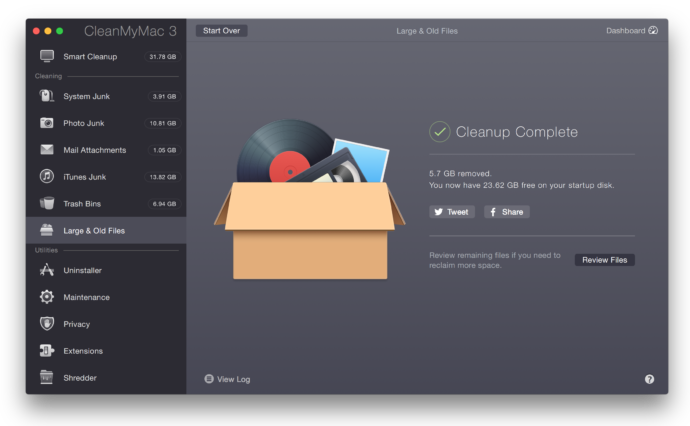
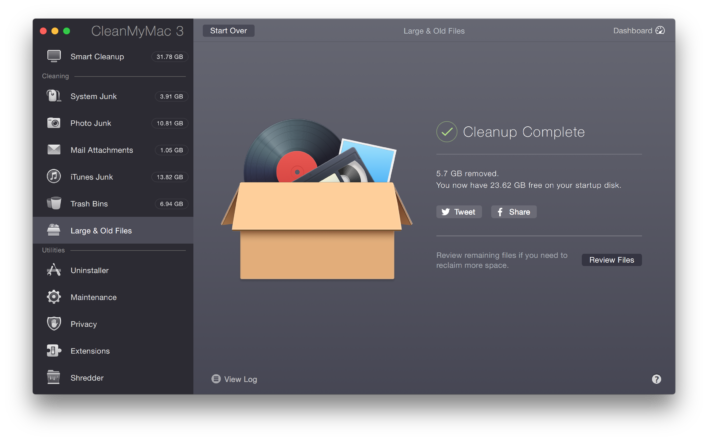
Large and Old Files Cleanup Complete
CleanMyMac 3 discovers files that you forgot even existed – so you can decide what’s really worth keeping.

Perhaps the better question is: Is it time to switch back to Firefox?

One of our staff members takes the plunge and uses Firefox Quantum for a month to see what all the fuss is about.
If you’ve never used Firefox before, or you jumped ship to another browser in the last few years, then Firefox Quantum is well worth downloading and installing. It’s fast, privacy oriented, endlessly customisable, easy to use, easy on the battery, and in many respects is better than its main competitor, Chrome.  It’s also packed with well thought out and helpful features.


Firefox Quantum: Better than Chome? We think so


Chrome may have just lost its sparkle

Google’s Chrome may be the world’s most popular web browser, but it might be time to admit that just because Chrome is the biggest browser out there, doesn’t mean it’s the best, anymore.
It may be hard to believe now, but anyone who can remember the web back in 2010 will remember that Mozilla’s Firefox was a pretty big player. Back then, it alone held sway over a third of the market, which considering the giants it was competing against, such as Microsoft, Yahoo, and of course Google, wasn’t bad going.

Chrome is not the only option out there, google it and see!


These days, Chrome can seem almost unavoidable, especially if you use an Android device. But that doesn’t mean you have to use it. There are a host of alternative browsers from Opera, Safari, Maxthon, and of course Mozilla’s Firefox.
There are many reasons why you should consider making the switch to Firefox.
For a start the Mozilla Foundation, the company behind the browser is, in their own words, “a non-profit organization that promotes openness, innovation and participation on the Internet.” That statement, if nothing else, should make anyone who uses Firefox feel better about themselves.
It’s also worth pointing out that considering the recent scandals and increasing awareness around the use of people’s data and privacy, such as the Facebook and Cambridge Analytica debacle of earlier this year, that Mozilla have been shouting about user control of their data since back in 2014.

Privacy? Mozilla have been having that conversation for years before it hit the headlines


Privacy built in


In 2014, Mozilla announced that it was majorly concerned about the way people were so easily giving up personal data to the ‘Web’ announcing that “fighting for data privacy — making sure people know who has access to their data, where it goes or could go, and that they have a choice in all of it — is part of Mozilla’s DNA.”
Practically four years later in 2018, Mozilla’s warnings of yesteryear are perhaps more prescient than ever before. Firefox has had a whole load of rules and limits in place for a long time, restricting what itself and others can infer from user data, and they take great pains to balance privacy against commercial interest. Plus they are not the personal data gathering monopolistic entity that is Google.

Don’t be evil?

You may know that one of Google’s big mantras used to be ‘Don’t be evil,’ but as we reported last month, that little line has recently quietly disappeared from their Code of Conduct. I’m just saying.
All that’s great, but I thought this article was all about why I should be thinking about switching to Firefox? It is. I’ve just taken my time getting there, but thanks for reading this far all the same. We appreciate it. So, why Firefox?

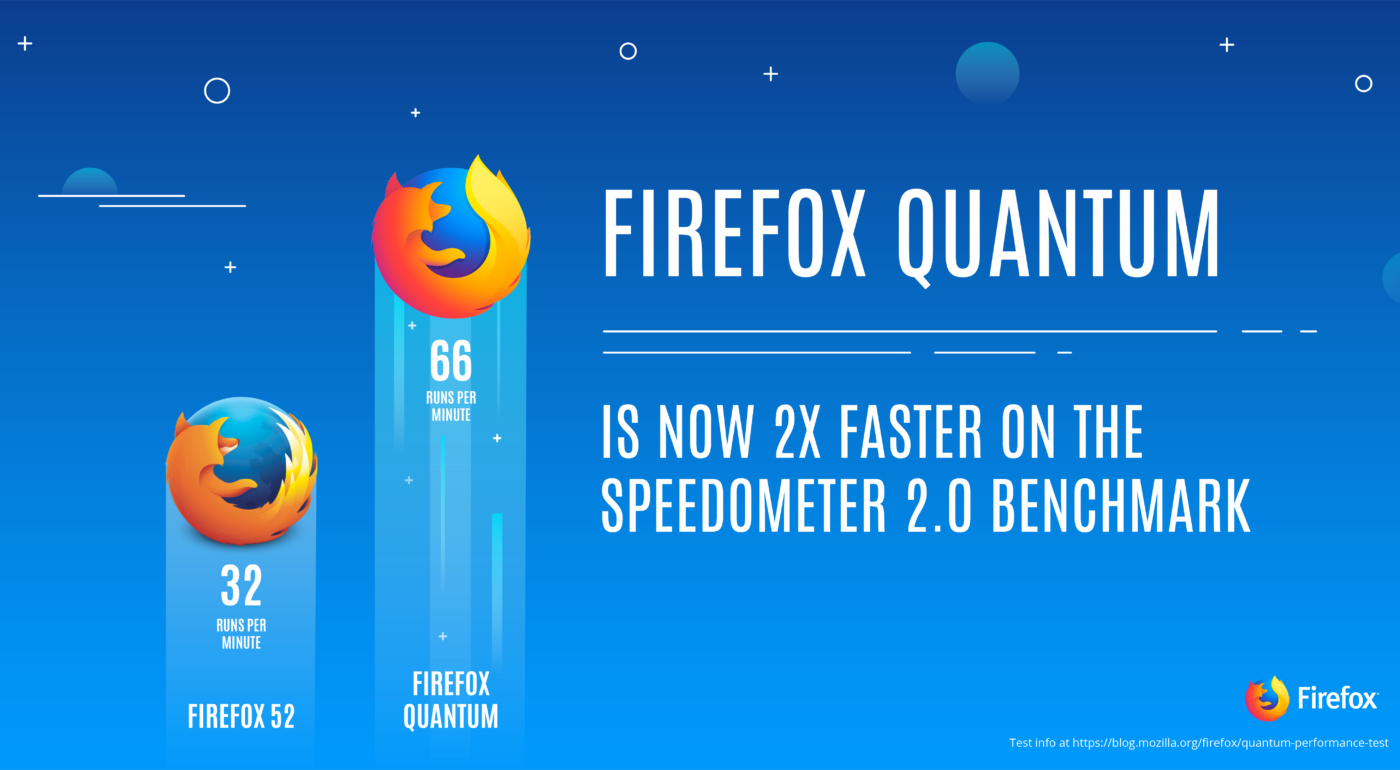
Speed. Firefox is fast and easy on the battery

Firstly, Firefox, or Firefox Quantum as the new version first released back in November, 2017, is known, is fast, faster in fact than any other browser currently available. For laptop users it’s also important to note that it doesn’t permanently damage your battery every time you use it. In fact, one of the shining lights of Firefox Quantum is that it really looks after your battery life, especially in real life conditions. Now, OK, Microsoft’s Edge has the best battery performance of all the browsers, but that’s Edge, and it’s not very good, despite what Microsoft insist on telling us.
As a browser, Firefox has taken some really good moves in the last year or so. The latest edition has finally made good on a whole lot of potential Mozilla have been striving for in the last year or so. Firefox is now a cutting edge way to surf the web.

Chrome and Firefox come from the same stable

Not many people know that both Chrome and Firefox are built using the same source code as each other, known as Chromium. But Mozilla have essentially re-built their browser from the ground up.
Firefox now has one of the cleanest and up-to-date takes on what a web-browser should be. It’s also a ridiculously easy browser to download and install.
Firefox’s recent changes aren’t just skin deep either. There’s an awful lot of impressive work that’s gone on behind the scenes and beneath the skin. For a start, Firefox has been built to take full advantage of today’s multi-core processors in a way that none of the other browsers out there, Chrome included. This means that Firefox is faster when working with multiple open tabs, and it’s surprising just how much crisper, cleaner and faster Firefox is than other browsers.

Firefox may just be another web browser, but it could also be the best


Image result for firefox


Crucially for most users, none of the complex working going on beneath the surface are all that important. Firefox is the same multifaceted and ever capable browser it always has been, just refreshingly better.
Perhaps the standout feature of the new Firefox is the screenshot tool (right-click in the context menu), which can capture an entire web page without the need to scroll up and down. It can also just capture a section if you’d rather. The screenshot is then uploaded to Mozilla’s servers and is stored there for 14 days for you to share or download.

But what about all my Chrome extensions and add-ons?

Don’t worry, you can keep them. Don’t forget, Chrome and Firefox are built on the same engine, which means that virtually all the Chrome extensions work just as well on Firefox. The same also goes for anyone using Opera extensions. Hurrah!
There are a host of extensions and the ability to customise user extensions is impressive to say the least. The changes aren’t just limited to the desktop PC version either. The updated Firefox Mobile app is also just as fast and lets you move effortlessly between devices.
In fact, after having used Firefox almost exclusively for the last month or so, I’m seriously considering moving away from even my own current favoured and excellent browser, Opera, permanently.
Firefox’s ability to integrate with mobile, is one of the most seamless and best efforts from any browser available. There’s a mobile version for every major platform so keeping everything in sync is easy.   

Firefox is not the Mig-31

Clint Eastwood has nothing to do Mozilla, as far as we know…


As an aside, there is no relation between the Firefox browser and Clint Eastwood movie of the same name from 1982. The movie was one of those eighties movies about US-Soviet tensions, and the theft of a prototype Russian stealth plane. It’s a tense and often moving movie set at the height of the Cold War. The last 20 minutes are somewhat silly, but still a good watch.

So what do we think of Firefox?

Firefox is a really good browser that looks good, is easy to use, and a definite and worthy contender to Chrome, and one that is making waves in 2018. It’s Hipster in a way that was cool before Hipster wasn’t cool.


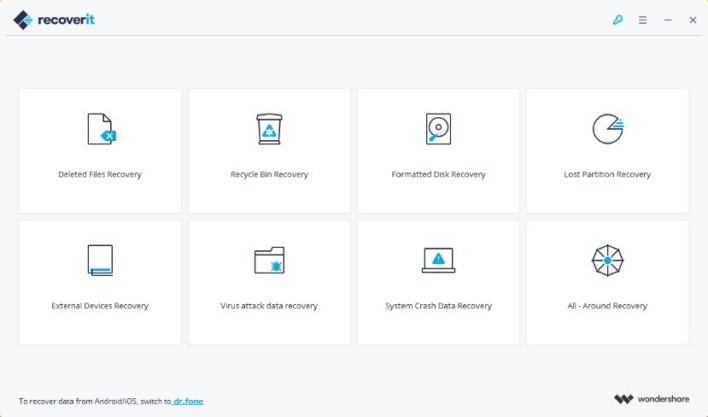
Recoverit is amazing free data recovery software for Windows that boasts a 96% recovery rate! 

Quite simply, Recoverit retrieves your data from all data loss scenarios including emptied recycle bin, accidental deletion, disk formatting, partition loss, external device corruption, virus attack, system crash, bootable problems, you name it! Wondershare know that lost data is so much more than just missing information… It can be precious photographs, vital documents, or your beloved music collection. That’s why Recoverit recovers all file types including documents, graphic, video, audio files, and email, to name a few. What’s more, it doesn’t matter where that pesky data is. Recoverit restores from all storage devices and including hard drives, SSD, RAID, USB drives, micro cards, memory cards, cameras, camcorders, music players, external disks – the list is almost endless. Recoverit Free is the free version of Recoverit Pro which allows you to recover up to 100MB data for free. Just try to use it whenever you are troubled by data loss.


As easy as 123 Recovering your lost files couldn’t be easier. Here’s how you do it with Recoverit: 1. Select Launch the Recoverit data recovery software and select a data loss scenario case to restore data.

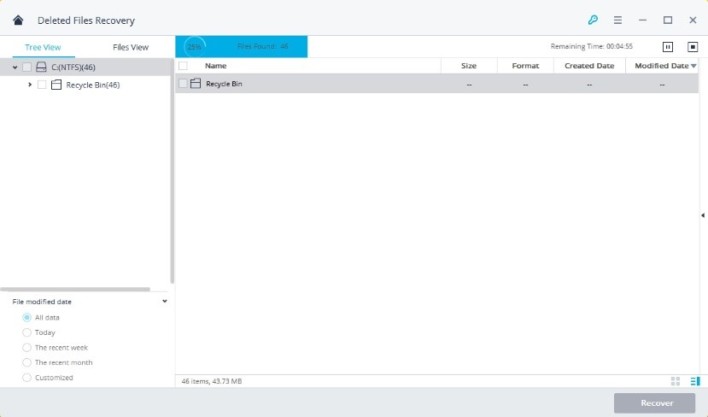
Recoverit - Select files


2. Scan Scan your device, select the path/location where the data loss occurred, and click “Start”.


3. Recover Selective recovery; preview, recover and save files. It’s as easy as that!


Advanced algorithm support Not only is Recoverit simple to use, it’s also super quick. Enjoy seriously fast scan speeds thanks to its powerful built-in Data-Analyzer Engine. While the Advanced Deep-Scan algorithm goes deep into the data structure and is the secret behind Recoverit’s amazing data recovery rate of more than 96%. Data recovery hacks from Recoverit Recover shift deleted files With today’s technological advancements you can recover ‘Shift Deleted’ files from your computer’s hard drive. There are powerful data recovery tools that come in sleek designs to cater for your data needs. Recover deleted word documents Did you know? When a file is deleted from a computer, it never disappears completely. There are still traces of it left behind. The chances are that you can recover it successfully by following Wondershare’s simple tips. Recover data from SD cards Data lost from SD cards can happen for many reasons such as users accidentally deleting images or formatting the card, or the card may simply become corrupted or inaccessible. Find out more about recovering SD data here. Recover data from recycle bin When files are emptied from the recycle bin, they are still stored on the computer hard drive disk. This means that you still have a chance to retrieve your data. To recover deleted files from recycle bin after emptied, you will need a data recovery software. Recover data from blue screen error or system crash When the system crashes, we need to select a USB bootable drive or CD/DVD bootable drive to create a bootable media. Recoverit Pro contains a bootable media and a system crash guide for you to recover data step by step. Download and recover your data So there you have it. Data recovery is easier, faster, and more reliable than ever before, thanks to Recoverit from Wondershare. It is fully compatible with Windows 10/8/7/Vista/XP, and with free 24/7 tech support, what are you waiting for?!
Link : Recoverit 7.1.0

Author Name

Biểu mẫu liên hệ

Tên

Email *

Thông báo *

Được tạo bởi Blogger.